Saurabh Rai
Stop Adding AI to Every Tool. Redesign How Your Team Works.
AI makes each step faster, but your work still waits between steps. A practical way to redesign one workflow around people and AI.
On this page
- AI Speeds Up the Steps. Your Delays Live Between Them.
- The Research Says the Same Thing, Politely
- Redesign Sounds Big. It Can Start With One Workflow.
- 1. Pick one workflow and map it as it really happens
- 2. Decide who does each step: a person, AI, or AI with a person checking
- 3. Write down the handoffs
- 4. Decide where decisions live
- 5. Change the rituals, not just the tools
- 6. Reward the attempt
- What This Looks Like on a Real Tuesday
- Why the Workspace Matters
- The Part Only You Can Do
- Sources
Say that six months ago you turned on AI everywhere it was offered. The docs tool writes first drafts. The chat app summarizes long threads. The task board suggests subtasks. The meeting tool writes its own notes.
So why does this Friday look exactly like a Friday from last year?
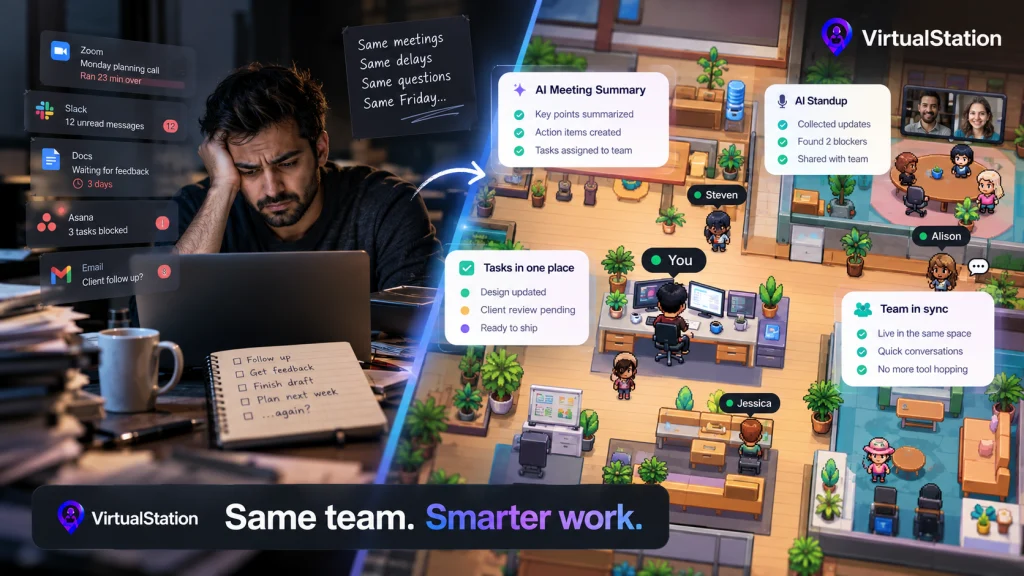
The same Monday planning call runs long. The same handful of decisions still wait for you. The same client deliverable sits “almost done” for three days because someone is waiting on feedback, and nobody is sure whose feedback. Drafts arrive faster now. They just wait in the same queues as before.
If that feels familiar, the tools are probably fine. What hasn’t changed is the way the work moves between people.
AI Speeds Up the Steps. Your Delays Live Between Them.
Here is something “AI productivity” advice tends to skip. We have no study to cite, but our view is that a lot of the elapsed time in a team workflow goes to waiting: for a review, for an answer, for the next meeting, for someone to notice a message.
Adding AI to each tool makes each step faster. Say a draft that took two hours now takes twenty minutes. If it then sits for two days waiting for approval, you’ve optimized the part that was never the bottleneck.
That’s why teams can adopt a lot of AI and feel only slightly faster. The handoffs, the approvals, and the “who decides this?” moments are where the time goes, and no feature inside a single tool can see them.
The Research Says the Same Thing, Politely
Microsoft, which sells AI tools for work, surveyed 20,000 knowledge workers who use AI in 10 countries between February and April 2026 for its 2026 Work Trend Index. Its analysis found that organizational factors such as culture, manager support and talent practices account for more than 2x the reported AI impact of individual factors such as mindset and behavior (67% vs. 32%). Microsoft is careful to call this an association, not proof of cause, and the impact is self-reported. Still, the direction is clear. How the team is set up matters more than how clever each person is with AI.
The same survey turned up what Microsoft calls the Transformation Paradox. 65% of those AI users worry about falling behind if they don’t adapt quickly with AI. Yet 45% say sticking to current goals feels safer than redesigning work with AI, and only 13% say they’re rewarded for reinventing their work with AI when the results don’t pan out.
Read those three numbers together and you get a very human picture. People know they should change how they work. The deadlines, the metrics and the unspoken rules all tell them to keep doing it the old way. So they add AI to the old way.
Gartner, the research and advisory firm, sees a version of this in sales. In a July 2026 press release it predicted that by 2028, sales leaders who overhaul data, automation and user experience will be five times more likely to gain ROI from AI than those who choose quick fixes. It’s a forecast, not a finding, but the logic holds for any team. Turning on a feature is the quick fix.
Redesign Sounds Big. It Can Start With One Workflow.
“Redesign the operating model” is the kind of phrase that makes a founder of a 12-person company close the tab. You don’t need a transformation program. You need an afternoon, a whiteboard, and one workflow that annoys everyone.
1. Pick one workflow and map it as it really happens
Choose something that repeats every week, like “client feedback to revised deliverable” or “bug report to fix shipped.” Write down every step as it actually happens today, not as the process doc says. For each step, note who does it, which tool it happens in, and roughly how long it waits before the next step starts.
Then compare the time spent working with the time spent waiting. That tells you where to start.
2. Decide who does each step: a person, AI, or AI with a person checking
Go step by step and make a deliberate call. Some steps are fine for AI alone, like turning a call into notes. Some need AI to draft and a person to approve, like a reply to an unhappy client. Some should stay fully human, like deciding what to cut from scope.
The point is to decide on purpose. Today most of these calls are made by whichever tool happened to ship an AI button.
3. Write down the handoffs
A handoff is where work changes hands, between two people or between an agent and a person. For each one, answer three questions: what gets handed over, where it lands, and who picks it up.
In Microsoft’s survey, even among its most advanced AI users (3,233 of the 20,000 respondents, whom it calls Frontier Professionals), only 26% say agent workflows, human handoffs and quality standards are documented and repeatable at the team level. Among everyone else it’s 19%. Most respondents do not have this yet, which is why we think it is a good place to start.
4. Decide where decisions live
Decisions get made in meetings, in DMs, in comment threads and in someone’s head on a walk. Then half the team never hears about them. Pick one place where a decision becomes official, and make “did it land there?” part of how every meeting ends.
5. Change the rituals, not just the tools
Rituals are where a team actually learns how to work. A few changes go a long way:
- Turn the daily standup from a status recital into a blocker review. If AI can collect the updates, the humans can spend the time unblocking each other.
- Add a short weekly look at AI output quality. Microsoft’s report says leading firms will need to answer questions like “Who reviews agent performance?” and who has the authority to change the workflows agents run. On a small team, the answer can be one person and a fifteen-minute slot.
- Once a month, ask what someone figured out with AI that the rest of the team should copy. Otherwise every good idea stays in one person’s browser.
6. Reward the attempt
If only 13% of people feel rewarded for trying to reinvent their work, playing it safe is the rational choice for everyone else. Say out loud that a redesign which doesn’t work the first time is still useful. Then use AI in your own work where people can see it. Microsoft’s report cites a separate Microsoft-led study of 1,800 workers in which employees whose managers actively modeled AI use reported a 17-point lift in the value they got from AI.
What This Looks Like on a Real Tuesday
Picture a small agency’s client feedback loop after this exercise. The client call is transcribed and summarized automatically. The action items become tasks with owners before anyone leaves the call. The designer revises with AI help. The account lead reviews once, in the same place the task lives, and the decision to send is recorded there too. The next morning’s standup only covers what’s stuck.
Nothing in that loop is exotic. Every piece already exists. What changed is that someone decided how the pieces connect.
Why the Workspace Matters
Redesign is mostly a thinking exercise, but tools can make it easier or harder. When meetings, chat, tasks and AI each live in separate products, every handoff crosses a tool boundary, and that’s where things get lost.
This is one reason we are building VirtualStation around a different assumption: that the people, the meetings, the tasks and the AI should share one workspace. Meeting summaries and action items sit in the same workspace as the tasks. AI standups collect updates and surface blockers next to the work they affect. It doesn’t redesign your workflows for you. It gives the redesign one place to live.
The Part Only You Can Do
AI will keep making every step faster. It can’t tell you which steps should exist, who owns the handoff, or where a decision becomes final. That work belongs to the people running the team, and it’s the work that makes everything else pay off.
Stop asking where else you can add AI. Start asking where your work waits.
If that’s the kind of problem you’re working through, VirtualStation is being built around exactly this idea. You can try it free whenever you’re ready.
Sources
- Microsoft, 2026 Work Trend Index, May 2026
- Gartner, AI agents will outnumber sellers 10 to 1 by 2028, July 2026
From the VirtualStation team
See who's around, what's moving and what's stuck
VirtualStation puts your team's presence, meetings, chat, tasks and AI standups in one workspace, so the answer to "how's it going?" is already on screen.
No credit card required