Tarun Kumar
5 Best SoWork Alternatives in 2026 for Remote Teams
Compare 5 SoWork alternatives for remote teams, including VirtualStation, Gather, Roam, Kumospace and WorkAdventure. See pricing, strengths and which one fits your team.
On this page
- Quick answer
- First: what are you actually trying to replace?
- 1. VirtualStation: for teams that want the office and the work in the same place
- 2. Gather: for teams that mainly want a great virtual office
- 3. Roam: for teams trying to consolidate the communication stack
- 4. Kumospace: for teams that want another visual-office experience
- 5. WorkAdventure: for teams that want control
- SoWork alternatives compared
- SoWork is already more than a virtual office
- Where SoWork is especially strong
- Don’t choose a virtual office from the feature table
- Which SoWork alternative should you choose?
- Frequently asked questions
- What is the best alternative to SoWork?
- Is there a free SoWork alternative?
- How much does SoWork cost?
- Does SoWork have tasks and project management?
- Does SoWork have AI standups?
- SoWork vs VirtualStation: what is the difference?
- SoWork vs Gather: which is better?
- Which SoWork alternative can I self-host?
- Which SoWork alternative is best for productivity?
- The alternative your team still wants to open three months later
- Sources
Five SoWork alternatives sorted by the problem you are actually trying to fix: running the work, culture and presence, tool consolidation, a different visual office, or self-hosting.
Say your team loved SoWork at first.
Everyone picked an avatar. Someone redesigned the office. A question that would normally become a Slack thread turned into a two-minute conversation because you could see the person was available and walk over.
Then the novelty wore off.
The project manager still wanted a clearer view of what was shipping. Some work still lived in another system. One manager cared more about blockers and ownership than office activity. Another team wanted a simpler virtual space. Engineering started asking whether they could host the whole thing themselves.
That does not mean SoWork failed.
SoWork has become one of the more complete virtual-office products in 2026. It now combines its spatial office with chat, meetings, AI meeting notes, analytics, tasks in beta, AI agents and integrations.
It may simply mean your team is trying to solve a different problem.
Some teams want the virtual office tied more closely to projects and execution. Some want culture and presence. Some want fewer tools. Some want another type of visual workspace. Some want infrastructure control.
Those teams should not all choose the same SoWork alternative.
Quick answer
Stay with SoWork if a customizable avatar-based office, spontaneous conversations, strong meeting features, AI meeting memory, analytics and team culture are the main things you want. SoWork currently has a free plan for up to 10 teammates, with paid plans adding video, recordings, AI summaries and deeper analytics.
Try VirtualStation if you want spatial presence plus projects, tasks, meetings, chat, time tracking, attendance and AI-assisted coordination in the same workspace.
Try Gather if your priority is a polished spatial office, spontaneous interaction and remote culture, while most project and operational work can stay in other tools.
Try Roam if you want to replace more of your communication stack with one structured workspace that includes meetings, messaging, scheduling, recordings and AI.
Try Kumospace if you want a customizable visual office with a different aesthetic and a strong focus on social connection.
Try WorkAdventure if open source, self-hosting and infrastructure control matter more than having everything managed for you.
First: what are you actually trying to replace?
“SoWork alternative” looks like one search query.
We think it can hide several very different problems. These are our examples, not customer quotes:
- You like SoWork, but projects and execution still live somewhere else.
- You mainly need presence and spontaneous conversations, not a broader operating system.
- You want to remove more tools from the stack.
- Your team likes the virtual-office idea but not SoWork’s particular visual style.
- You want AI to understand more than meeting transcripts.
- You need more control over hosting, privacy or infrastructure.
- The office looked great in the demo, but your team gradually stopped opening it.
Before comparing feature tables, decide which problem sounds most like your team.
Otherwise you can replace SoWork and still be searching for another alternative six months later.
1. VirtualStation: for teams that want the office and the work in the same place
VirtualStation starts from a similar idea to SoWork: remote teammates should feel like they are somewhere together rather than appearing only as names in a chat sidebar.
People share a visual workspace, can see who is available, move around, join rooms and start quick conversations without scheduling another call.
The bigger difference is what sits around that office.
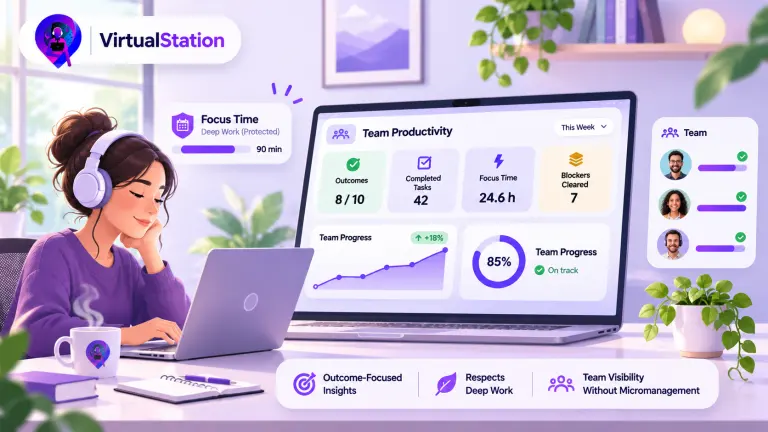
VirtualStation also brings projects, tasks, chat, meetings, attendance and time tracking into the same workspace.
Its AI is designed around the work happening there too: meeting summaries, standups, work updates and blockers can sit closer to the projects and people they belong to.
The question becomes more than:
“Can I see and talk to my remote team?”
It becomes:
“Can I understand what the team is working on without jumping through five different tools?”
That is where VirtualStation is trying to differentiate.
VirtualStation is worth considering if your team likes spatial presence but wants fewer gaps between conversations, projects, tasks, standups and day-to-day management.
The current Pro plan is $15 per person per month or $12 per person per month billed yearly. There is also a free plan for small teams and a 14-day Pro trial.
It may not be the best fit if your biggest priority is elaborate office customization, games and the mature virtual-world experience itself. SoWork is particularly strong there.
2. Gather: for teams that mainly want a great virtual office
Gather remains one of the closest alternatives to SoWork.
Its core idea is familiar: teammates share a visual office, move around as avatars, see who is nearby and start conversations naturally.
Gather 2.0 has expanded well beyond the original map.
It now includes persistent chat, DMs, groups, public and private channels, threads, meetings, coworking sessions, recordings, meeting transcription and AI meeting notes.
That makes it a stronger communication product than older Gather comparisons suggest.
The difference is where the center of gravity sits.
Gather is still especially compelling when you want presence, culture and spontaneous communication, while project management, task tracking and broader operational workflows continue to live somewhere else.
Its current price is $15 per member per month or $12 when billed annually, with a 30-day trial rather than a permanent free plan.
Gather is worth considering if your team wants a mature virtual-office experience but does not necessarily want that office to become the system where the company manages all of its work.
If you are leaving SoWork because you want deeper projects, task ownership or management visibility, changing to Gather may not solve the problem you started with.
3. Roam: for teams trying to consolidate the communication stack
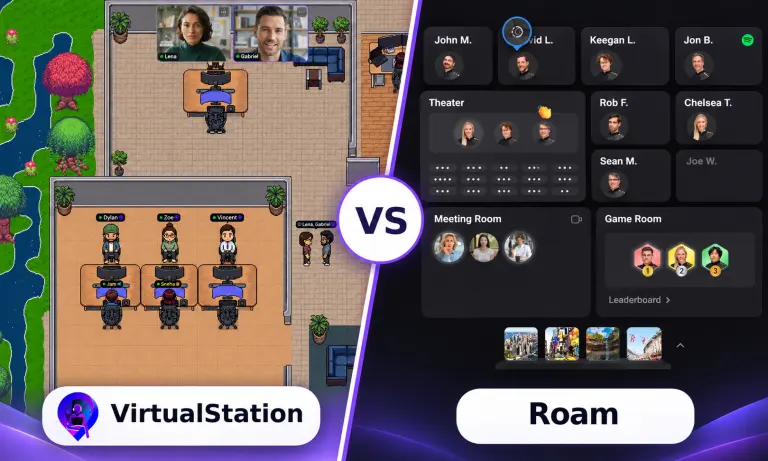
Roam takes a more structured approach to the virtual office.
Instead of making the workspace primarily about walking an avatar around a map, Roam organizes the company around rooms, presence and quick access to people.
You can see where teammates are, knock, join a conversation and return to your own room when you are finished.
Around that office, Roam bundles several products that teams often buy separately.
Its current Virtual Office bundle includes:
- Drop-in meetings
- Messaging
- AI meeting summaries
- Meeting scheduling
- Screen recording
- Company-wide events
- An office-aware AI assistant
Roam currently charges $19.50 per active member per month.
There is no annual commitment. Billing is monthly and based on active members rather than every person who has an account.
That makes the comparison with SoWork more interesting than simply looking at price per seat.
Roam is worth considering if your goal is to replace several communication products at once and you prefer a more structured workspace over a playful avatar world.
If the custom spatial environment, avatars and office culture are the part of SoWork your team loves, Roam is solving a related but different problem.
4. Kumospace: for teams that want another visual-office experience
Kumospace stays close to the core virtual-office idea but presents it differently.
It uses customizable floors and rooms with an illustrated office aesthetic, along with spatial communication, chat, statuses, screen sharing and interactive objects.
The free plan supports up to five registered members.
Its Business plan is currently $16 per member per month when billed annually, or roughly $20 on monthly billing, and adds features such as:
- Chat channels and group DMs
- Unlimited chat history
- Meeting recording
- User analytics
- Multiple floors
- Privacy and access controls
Kumospace also includes social elements such as games, whiteboards, interactive furniture and shared activities.
Kumospace is worth considering if your team likes the idea of a persistent shared office but SoWork’s particular interface or visual style does not fit how you want your company to feel.
The difference here is less about one product having a feature that the other completely lacks.
It is about which environment your team actually enjoys returning to every day.
5. WorkAdventure: for teams that want control
Some teams searching for a SoWork alternative are not looking for another managed SaaS product.
They are looking for something they can control.
WorkAdventure uses an avatar-based virtual-world model with spontaneous audio and video conversations, chat, statuses, screen sharing, customizable maps and embedded applications.
Its free hosted plan supports up to 10 simultaneous users.
Business currently starts at €8 per user per month.
The bigger difference is self-hosting.
WorkAdventure supports deploying the platform on your own servers or private cloud, giving technical teams more control over their environment, security and operations.
It also supports configurable AI bots that can handle jobs such as questions and answers, translation and meeting summaries.
WorkAdventure makes sense if infrastructure control or deep customization matters more than having everything operated for you.
The trade-off is straightforward:
Self-hosting gives you more control, but it also gives you more infrastructure to operate.
If you simply want to create an office and invite your team without thinking about any of that, SoWork or another managed service will probably be easier.
SoWork alternatives compared
| App | Best for | Beyond the virtual office | Price |
|---|---|---|---|
| SoWork | Customizable avatar office, AI meetings and team culture | Chat, AI meeting notes, tasks in beta, analytics, AI assistants | Free up to 10 members. Basic $5.40/user billed yearly. Premium $12/user billed yearly |
| VirtualStation | Running more of the work from the same place you meet | Projects and tasks, AI standups and meeting summaries, attendance, time tracking and team visibility | Free plan for small teams. Pro $15/user monthly or $12 billed yearly |
| Gather | Culture and spontaneous interaction | Meetings, full chat, coworking, recordings, transcription and AI meeting notes | $15/user monthly or $12 billed yearly. 30-day trial |
| Roam | Replacing several communication tools | Drop-in meetings, messaging, events, scheduling, screen recording and AI | $19.50 per active member/month. Billed monthly |
| Kumospace | A customizable visual office with a different aesthetic | Chat, recordings, multiple floors, activities and analytics | Free up to 5 members. Business $16/user billed yearly |
| WorkAdventure | Self-hosting and infrastructure control | Custom maps, integrations, AI bots and embedded apps | Free up to 10 simultaneous users. Business from €8/user/month. Self-hosting available |
Prices are based on each vendor’s public pages and were checked in November 2026. Plans and features change, so check the current plan before buying.
SoWork is already more than a virtual office
One reason this comparison needs some nuance is that SoWork itself has changed.
SoWork now combines:
- Avatar-based office presence
- Walk-up audio and video conversations
- Meetings and multiple screen sharing
- Channels, DMs and threads
- Meeting recordings
- AI summaries, transcripts and action items
- Team analytics
- Projects, boards and tasks in beta
- An Office Assistant in beta
- An AI Standup Bot in beta
- Calendar, Slack, Google Drive, Zapier and API integrations
- Connections to MCP-compatible AI tools such as ChatGPT and Claude on Premium
- Team games and events
Its official facts page was updated on November 24, 2026 and describes SoWork as a product where the office, chat, meetings, AI meeting notes, tasks and analytics live together.
That means the old comparison:
“SoWork is the virtual office; another tool is where you manage the work”
is becoming less accurate.
The better question is how deep each of those workflows goes and which ones matter most to your team.
Where SoWork is especially strong
If your team likes SoWork, there are good reasons not to move.
Its current free plan supports up to 10 teammates.
Its Basic plan is inexpensive for a virtual-office product.
Its Premium tier combines AI meeting notes, transcripts, action items and Team Analytics with the office itself.
SoWork has also been shipping quickly. During 2026 it added or expanded features including team analytics, Google Drive integration, its public API, flexible working hours, app-focus sharing, mobile capabilities and MCP connections for AI tools.
It also puts more emphasis than many products on the office being enjoyable to use, with customization, games, pets, clothing and shared social experiences.
If those are exactly the things keeping your remote team connected, switching because another product has a longer feature table would make little sense.
Don’t choose a virtual office from the feature table
Every product on this page can look impressive in a demo.
That is not the test.
The real question is:
Will your team still open it on a completely ordinary Wednesday three months later?
Before moving the whole company, run your preferred option with five or ten people for a couple of weeks.
Do not only ask whether they liked the product.
Ask:
- Did people open it without being reminded?
- Did quick questions become quick conversations instead of scheduled meetings?
- Did another tool actually become unnecessary?
- Could people tell when somebody was available without messaging first?
- Could managers understand what was moving without chasing everyone?
- Did meeting decisions turn into clear work?
- Did people eventually fall back to Slack, Zoom or the old workflow?
- Did the new workspace simplify work, or did it become another tab?
The first week measures novelty.
The third month measures whether you actually changed how the team works.
Which SoWork alternative should you choose?
You already like SoWork’s office, AI meeting tools and culture features: SoWork may still be the right answer.
Spatial presence plus projects, productivity visibility and AI-assisted coordination: look at VirtualStation.
A polished virtual office that can sit beside the tools you already use: look at Gather.
Maximum communication-tool consolidation with a structured interface: look at Roam.
A customizable visual office with another look and feel: try Kumospace.
Self-hosting and infrastructure control: look at WorkAdventure.
The important thing is not choosing the product with the most checkmarks.
It is understanding what you are actually trying to fix.
Frequently asked questions
What is the best alternative to SoWork?
There is no single replacement that is best for every remote team.
VirtualStation is aimed at teams that want spatial presence plus projects, tasks, team operations and AI-assisted coordination.
Gather is strong for a mature virtual-office experience and spontaneous collaboration.
Roam focuses more heavily on consolidating communication tools.
Kumospace offers another highly visual and customizable office experience.
WorkAdventure stands out if self-hosting and infrastructure control are priorities.
Is there a free SoWork alternative?
Yes.
SoWork itself currently has a free plan for up to 10 teammates.
Kumospace has a free plan for up to five registered members.
WorkAdventure has a hosted free plan supporting up to 10 simultaneous users.
VirtualStation also has a free plan for small teams.
Gather currently offers a 30-day trial instead of a permanent free plan.
How much does SoWork cost?
SoWork currently has three main plans.
The Free plan supports up to 10 Admins and Teammates.
Basic costs $5.40 per person per month with yearly billing and includes video, unlimited meeting length, full team chat and limited meeting recordings with AI notes.
Premium costs $12 per person per month with yearly billing and adds unlimited AI meeting summaries, Team Analytics, additional integrations and other advanced features.
Monthly pricing is higher.
Does SoWork have tasks and project management?
Yes.
SoWork’s current official product information lists projects, boards and tasks, although it still describes the feature as beta.
Tasks can also be created from meeting action items.
If project management is the main reason you are considering leaving SoWork, test the workflow directly rather than assuming every product that lists “tasks” provides the same depth.
Does SoWork have AI standups?
Yes.
SoWork currently lists a Standup Bot in beta that can run daily standups.
That means AI standups alone are no longer a meaningful reason to say another product is automatically better than SoWork.
Compare how the standup information connects to projects, tasks, blockers and management workflows instead.
SoWork vs VirtualStation: what is the difference?
Both are moving beyond the idea of a basic virtual office.
SoWork combines a customizable spatial office with meetings, chat, AI meeting memory, analytics, tasks and AI agents.
VirtualStation combines its virtual office with projects, tasks, meetings, chat, time tracking, attendance and AI-assisted workflows such as standups, summaries and blocker visibility.
The practical distinction is where each product puts the emphasis.
SoWork has a mature spatial-office and culture experience.
VirtualStation is aimed more heavily at connecting presence with day-to-day execution and management visibility.
The best way to decide is to test both with the team that will actually use them.
SoWork vs Gather: which is better?
SoWork and Gather are both strong spatial-office products.
SoWork currently has a free plan for up to 10 people and a lower paid entry price. It also puts significant emphasis on Team Analytics and its expanding AI-agent layer.
Gather 2.0 includes a mature virtual office, persistent chat, channels and threads, coworking sessions, meeting recording, transcription and AI meeting notes.
If price and SoWork’s broader analytics and AI direction matter most, SoWork is compelling.
If your team prefers Gather’s particular spatial experience, the fact that SoWork has more checkmarks may not matter.
Which SoWork alternative can I self-host?
WorkAdventure.
It supports deployment on your own servers or private cloud.
That makes it one of the clearest choices for organizations that need more control over infrastructure, security or data.
The trade-off is that self-hosting also creates additional operational responsibility for your technical team.
Which SoWork alternative is best for productivity?
That depends on what you mean by productivity.
Roam focuses on consolidating several communication and collaboration products.
VirtualStation combines the virtual office with projects, tasks, attendance, time tracking and AI-assisted coordination.
If your definition of productivity is simply making spontaneous collaboration faster, Gather or SoWork may already be enough.
Do not choose based on a productivity claim alone. Decide which information and workflows you are trying to bring together.
The alternative your team still wants to open three months later
A virtual office can look incredible on day one.
The real test happens after the avatars stop feeling new.
SoWork is increasingly strong at combining the spatial-office experience with communication, AI meeting memory, analytics and emerging work-management features.
Gather continues to optimize strongly for virtual presence and spontaneous collaboration.
Roam leans toward communication-tool consolidation.
Kumospace gives the visual-office idea another style.
WorkAdventure gives technical teams more control over the infrastructure.
VirtualStation is our answer for teams that do not want to choose between feeling together and running the work from the same place.
If that is the problem your team is trying to solve, start with a few teammates.
Use VirtualStation for real work for a couple of weeks.
Then judge it by the same question you should ask of every product on this list:
Did working remotely become easier, or did we just add another tool?
Sources
- SoWork - Facts & AI Grounding Reference
- SoWork - Pricing
- SoWork - What’s New
- VirtualStation - Virtual Office
- VirtualStation - VirtualStation vs Gather
- Gather - Gather 1.0 vs Gather 2.0
- Roam - Pricing
- Kumospace - Pricing
- WorkAdventure - Pricing and Self-Hosting
From the VirtualStation team
See who's around, what's moving and what's stuck
VirtualStation puts your team's presence, meetings, chat, tasks and AI standups in one workspace, so the answer to "how's it going?" is already on screen.
No credit card required