Saurabh Rai
How to Cut Your Team’s Meetings Without Losing the Plot
Cancelled meetings come back as DM threads and quick calls. This one-week audit finds the job each meeting does, then tests whether you cut too much.
On this page
- To Reduce Meetings, Count the Ones That Are Not on the Calendar
- How Far to Cut: Further Than You Think, but Not to Zero
- Run This Audit This Week
- Monday: Get the real list
- Tuesday: Name the job
- Wednesday: Decide what happens to each job
- Thursday: Pause, do not delete
- Friday: Set the plot test
- Three Ways This Goes Wrong
- Where VirtualStation Fits
- Sources
A meeting you cancel can come back in disguise.
Cancel the Tuesday product sync and your calendar looks wonderful for about a week. By the following Monday you may have a long DM thread, two quick calls that were never on anyone’s calendar, and a founder asking in three different places where the launch stands.
That sync may well have been terrible. It was also the only place those people found out what the others were doing. So if you want to reduce meetings, remote team or not, cutting is the easy half.
A meeting is often a bad container for a job someone still needs done. Throw out the container and the job goes looking for a new one.
The audit below is built around that idea. It takes a week, it needs no new software, and it ends with a test for whether you cut too much.
To Reduce Meetings, Count the Ones That Are Not on the Calendar
Start with what you cannot see. In a June 2025 report, Microsoft, which sells workplace software, said 57% of meetings in its Microsoft 365 data were ad hoc calls without a calendar invite. The report’s own methodology note gives 60% and says the figure covers the top 20% of users by meeting volume, so these are heavy meeting users, and the data excludes education and EU customers.
Your team will not match that exactly. The lesson still holds: a calendar audit can miss a large part of the talking, and cutting scheduled meetings can push more of it into the part you cannot see.
There is also plenty of reason to look. In a survey of 5,000 knowledge workers by Atlassian, which sells collaboration software, 62% said they often attend meetings whose invite states no goal, 70% rated meetings ineffective for status updates, and 80% said most of their meetings could be done in half the time. That is perception, not measurement, and it comes from a vendor with a stake in the answer.
How Far to Cut: Further Than You Think, but Not to Zero
The best-known evidence comes with large caveats. In MIT Sloan Management Review in 2022, Ben Laker and colleagues reported on 76 companies, each with more than 1,000 employees, that had introduced no-meeting days. Nearly half had cut meetings by 40% with two such days a week. The authors reported that productivity came out 71% higher at that level, and that benefits leveled off once meetings were cut by 60% and declined beyond that. Satisfaction, productivity, engagement and cooperation all fell when meetings were eliminated entirely.
These were large companies, the results rest on employee ratings and pulse surveys, and the article describes no control group. Do not expect a 71% gain on a 12-person team. Take the shape of the finding: cutting a lot can help, and cutting everything can hurt.
Shopify gives you a useful mechanic. In January 2023 it removed recurring meetings with three or more people from calendars, according to an internal letter reported by Fox Business, which put the total above 76,500 hours. That number counts hours taken off calendars, not results, and we found no independent check of it. The detail worth stealing is what came next: employees were asked not to add those meetings back for at least two weeks, then to be “really, really critical” about what returned.
Run This Audit This Week
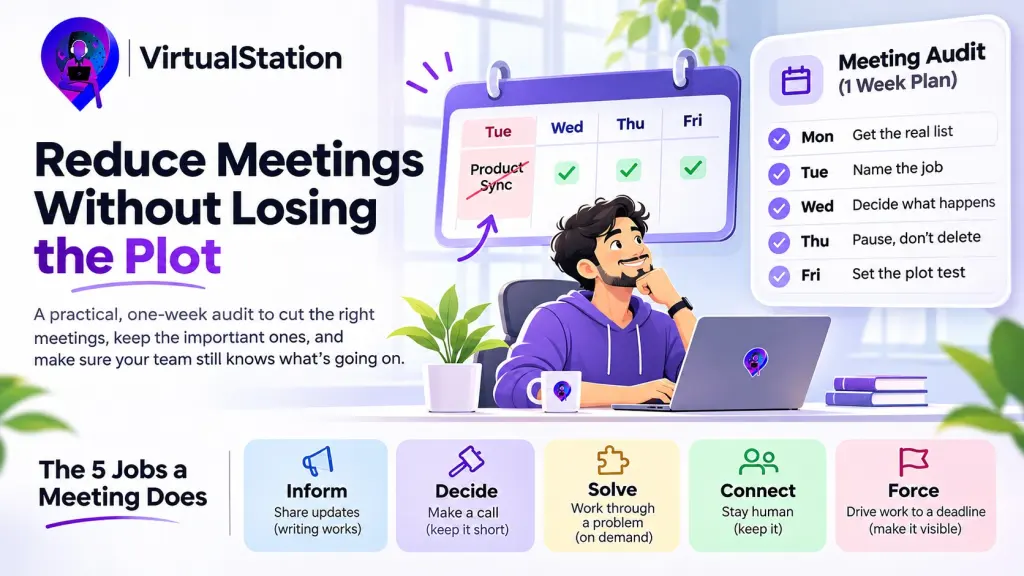
Monday: Get the real list
Export every recurring meeting from the last two weeks and work out its monthly cost in person-hours. A weekly 45-minute call with eight people comes to about 26 hours a month. Then ask everyone to keep a tally for the week: one line for each unscheduled call, with its rough length and topic. You will want this number later.
Tuesday: Name the job
Give each meeting one job from this list. Ask the organizer and one of the quieter attendees: “What would break if this stopped for two weeks?” Two different answers are a finding in their own right.
- Inform: people find out what is happening.
- Decide: someone makes a call that needs other people’s input.
- Solve: people work through a hard problem together.
- Connect: people stay human to each other.
- Force: the meeting’s real function is to make sure the work is done by Thursday. Many are, and few will admit it.
Wednesday: Decide what happens to each job
- Inform goes in writing. A short post at a fixed time, with a rule about who reads it. This is usually your biggest saving.
- Decide stays, and shrinks. Invite the people with input, and name the decider on the invite. Cut the length to 25 minutes. Post the decision and the reason in writing for everybody else.
- Solve goes on demand. Hold it when there is a problem. Delete the recurring slot.
- Connect stays. Say out loud that this is what it is for, then stop loading it with status. This is the last thing to cut on a remote team, and the first thing people want to cut.
- Force becomes a visible date. Put the deadline on the board, with a name next to it. If work still only happens because a meeting is coming, keep the meeting and shorten it. That is cheaper than pretending.
Thursday: Pause, do not delete
Pause everything you are cutting for two weeks, and tell the team three things: what is paused, what job it was doing, and where that job has moved. Then set one rule: anyone can bring a meeting back, as long as they name the job it does that nothing else now covers.
Friday: Set the plot test
Write down the person-hours you removed and last week’s ad hoc tally. Then write three questions that anyone on the team should be able to answer without asking someone:
- What is the most important thing we are doing this week?
- What is stuck right now?
- What did we recently decide, and why?
Two weeks later, ask three people, including someone junior, separately. Run the ad hoc tally again too.
Matching answers and a flat tally mean you cut fat. If the answers differ, you cut something the team was relying on, so bring back the smallest version of it. If the tally has jumped, the meetings have only gone underground, and the hours you think you saved are still being spent.
Three Ways This Goes Wrong
- The founder is exempt. If your own recurring meetings stay untouched, everyone will read that correctly. Put yours through the audit first.
- Chat absorbs the difference. A cancelled meeting that becomes 40 messages across a day may cost more focus than the meeting did. Watch for this in the second week.
- One-to-ones get cut for looking inefficient. They rarely show up as a problem until someone resigns. Unless both people agree a one-to-one has stopped being useful, leave it alone.
Related reading: how to run an async standup and why meeting action items die by Friday.
Where VirtualStation Fits
You do not need us for this audit. A calendar export, a shared doc and a tally will do. If the “Inform” pile turns out to be your biggest, AI standups in VirtualStation can carry some of it in writing on Pro, and AI meeting summaries give anyone who skipped a call a recap and suggested next steps.
One caution from our own side of the fence. A virtual office makes it easy to walk up and talk, and those quick conversations belong on your ad hoc tally like any others.
The goal was never an empty calendar. It is a team that still knows the plot when the calendar is half as full.
Sources
- Microsoft, Breaking down the infinite workday, June 2025
- Atlassian, Workplace Woes: Meetings
- Laker, Pereira, Budhwar and Malik, The Surprising Impact of Meeting-Free Days, MIT Sloan Management Review, January 2022
- Fox Business, E-commerce giant cancels 76,500 hours of meetings in new year, January 2023
- VirtualStation, AI Meeting Summaries
From the VirtualStation team
See who's around, what's moving and what's stuck
VirtualStation puts your team's presence, meetings, chat, tasks and AI standups in one workspace, so the answer to "how's it going?" is already on screen.
No credit card required