Saurabh Rai
Attendance for Remote Teams: Tracking It Without Treating Adults Like Children
When attendance records are worth keeping, what they can never tell you about someone's work, and seven rules for running them without suspicion.
On this page
The best attendance record in your company may belong to the person who got the least done last month.
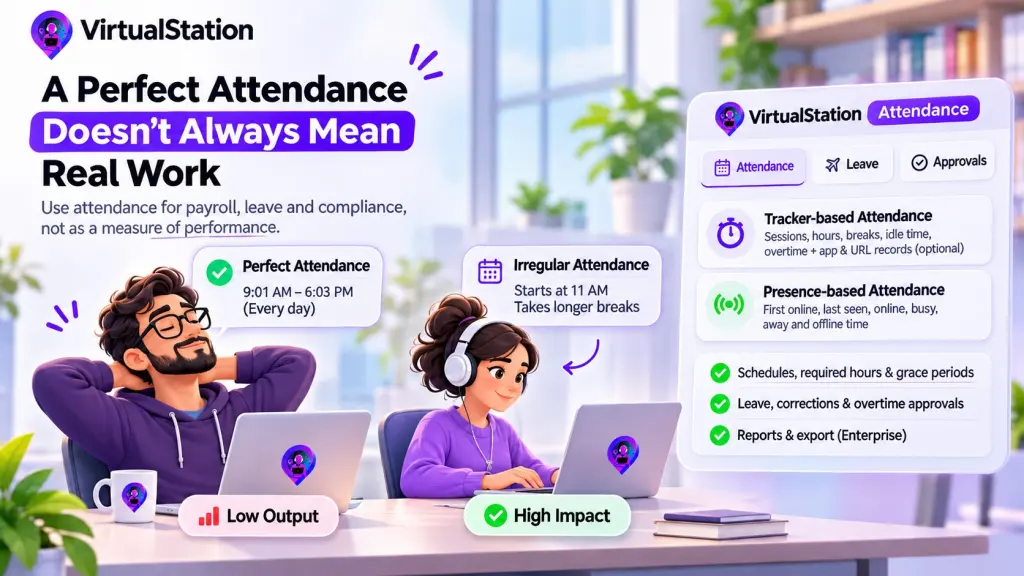
Attendance software will happily show you someone online from 9:01 to 6:03 every day this month, never late, never missing. It will also show a colleague who starts at 11 some days, disappears for two hours on Wednesdays, and shipped the thing your biggest client asked for. Both records can be perfectly accurate. Neither one tells you who did the work.
That does not make remote attendance tracking pointless. Plenty of teams need it for good reasons. The trouble starts when a report built to answer “were the hours worked?” gets read as an answer to “is this person any good?”
Attendance is a payroll fact. It is not a performance signal. Almost everything that goes wrong with it comes from mixing those up.
Start With the Reason You Need It, If You Do
Before choosing a system, finish this sentence: “If we stopped recording attendance tomorrow, ___ would break.” Common honest answers:
- Payroll. Hourly staff, overtime and shift pay need accurate hours. If you pay by the hour, this is not optional in any practical sense.
- Leave. Who is off, how much they have left, and whether a client deadline has cover. Many salaried teams need this part and nothing else.
- Compliance. Some places require working time records. In the US, the Department of Labor’s recordkeeping fact sheet says employers must keep hours worked each day and each workweek for covered, non-exempt workers, and that they “may use any timekeeping method they choose” as long as it is complete and accurate. In 2019 the EU’s top court ruled that member states must require employers to set up a system for measuring the time each worker works each day. These are two examples, not a guide to your obligations, so check with a lawyer or accountant where you employ people.
- Client contracts. Some agreements require you to show staffed hours.
If your sentence ends with “nothing, but I’d feel less sure people are working”, you have a trust or a visibility problem, and an attendance system will not solve it. Seeing the work itself is a better place to start. A salaried team of eight with shared leave rules may only need a leave calendar.
What You Should Not Read Into Remote Attendance Tracking
An attendance record is honest about a narrow thing. Here is what it cannot tell you.
- Online does not mean working. A green dot means an app is open, perhaps on a laptop near a sandwich.
- Offline does not mean absent. Reading a contract on paper, thinking on a walk and sitting in a client’s office can all look like nothing.
- Early and late are not character traits. A 9:04 start may be a school run. Unless the role has a real start time, like a support shift, it is not a finding.
- Long hours are not commitment. They may be a workload problem, or someone who struggles to finish. A record of ten-hour days should worry you before it impresses you.
- A perfect record is not a good sign on its own. It may be a good employee, or it may be someone who has learned what the report rewards.
That last one has a second-order cost. In our view, the moment people believe presence is being judged, some of them will start producing presence: staying logged in, answering quickly to look awake, keeping the status green. There is enough of this in the market that Time Doctor’s pricing page lists mouse jiggler detection as a Premium feature. When a tool has to detect people faking the thing you measure, it is worth asking what the measuring is buying you.
How to Run It Without Treating Anyone Like a Child
These rules take an afternoon to set up, and you can start tomorrow:
- Write the rule in two sentences and publish it. For example: “Support works 9 to 5 in your own time zone with a 15-minute grace period. Everyone else needs to overlap between 11 and 3 and work their contracted hours across the week.” If you cannot state the rule that plainly, you do not have one yet.
- Give each team only the signal it needs. A support rota may need start times. An engineering team may need only total hours and leave. One company-wide setting usually means rules written for the strictest role get applied to everyone.
- Let people fix their own records. People forget to clock out. Make correction a normal request with a quick approval, and do not treat it as a confession.
- Review exceptions, not people. A manager should see missed time, short days and overtime waiting for a decision. Nobody needs to watch a live board of who is online at 9:05.
- Look at it on a payroll rhythm. Weekly or monthly is enough for most teams. Daily checking is where this drifts into supervision.
- Keep it out of performance reviews. Say so in writing. If someone truly is not working their agreed hours, raise that as a conversation about hours, with the record as a starting point and their explanation as the next step.
- Watch overtime as closely as absence. A record that only ever gets used against people for being short will never be trusted. Use it to send someone home too.
Related reading: time tracking without surveillance.
How VirtualStation Handles Attendance
VirtualStation has an attendance feature on Pro and above, and it offers two signals you can choose between or combine. Tracker-based attendance is built from sessions the employee starts, showing recorded hours, breaks, idle time and overtime. Presence-based attendance uses time in the app, showing first online, last seen, and online, busy, away and offline time, with no timer involved.
Those two are not equal in what they bring along. Tracked sessions are time tracking, so while someone is tracking, app and URL records, productivity analytics and any screenshots your admins have configured come with them. If you only need attendance, presence may be enough. Presence intervals are recorded automatically while people are in the app, so tell your team that too.
Its page describes schedules, required hours and grace periods set by team, and managers handle leave, corrections, short days and overtime from one approval queue, with the approver, time and note saved. Pro includes one leave policy. Multiple policies, holidays and export are on Enterprise, which matters if your payroll depends on a file. Our page also shows a “top attendance” list. Treat it as you would the rest of this data: a record, not a ranking.
If you need the records, you can compare the plans and try it on one team first. If a shared leave calendar would do, use that and save the money.
Record who was there when payroll, leave or the law needs to know. For everything else, ask what got done.
Sources
From the VirtualStation team
See who's around, what's moving and what's stuck
VirtualStation puts your team's presence, meetings, chat, tasks and AI standups in one workspace, so the answer to "how's it going?" is already on screen.
No credit card required