Saurabh Rai
VirtualStation: The Virtual Office for Teams and AI Agents
A virtual office for teams and AI agents. Its AI runs standups, joins meetings and answers questions about your own projects, using only what you can open.
On this page
- An Office Is Where Context Lives
- The Virtual Office Your People Work In
- An AI Agent That Shows Up to Work
- Company Context: Ask Your Company, Not the Internet
- From Answers to Work, With a Person Signing Off
- What It Won’t See, and What It Won’t Touch
- Is a Virtual Office for Teams and AI Agents Right for You?
- What to Do Tomorrow Morning
- Related Reading
Your team already has an AI coworker. It just never got a desk in the office.
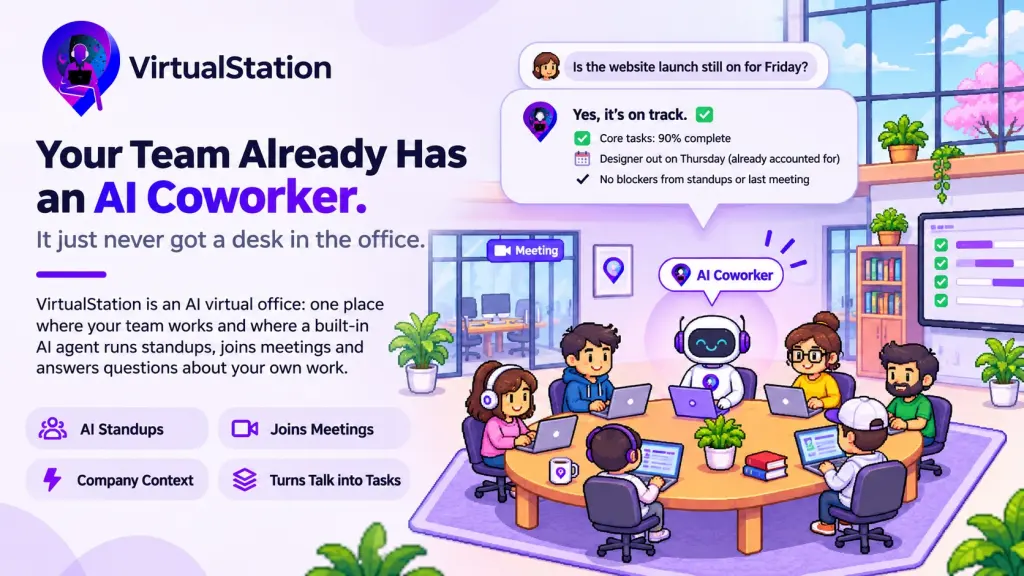
VirtualStation is an AI virtual office: one place where your team works and where a built-in AI agent runs standups, joins meetings and answers questions about your own work. Here is what that looks like on an ordinary Monday.
Picture this invented example. A seven-person product team works across three time zones. On Monday morning the founder wants to know one thing: is the website launch still on for Friday?
The answer exists, but it’s in pieces. Part of it is on the task board, part in two meeting recaps, and part in a standup thread. The rest is in a group chat where the designer mentioned she is out on Thursday. The founder has an AI assistant open in another tab. It can write a fine paragraph about website launches in general, but it can’t tell her anything about this one.
So she does what founders do. She messages four people and waits.
The AI isn’t the weak part here. It works outside the office, and the work happens inside it.
An Office Is Where Context Lives
People in a physical office pick up context without trying. They overhear the hallway conversation, see who is stuck in a meeting and notice when someone leaves early. Remote teams lost most of that. A virtual office exists to bring some of it back: a shared map, rooms you can walk into, and voices that get clearer as you move closer.
AI has the same problem in a sharper form. A chatbot in a separate tab knows nothing about your company unless someone pastes it in. Every question starts with a briefing, and after a few weeks the tab stays closed.
If AI is going to be part of the team, it needs what any new teammate needs. It should work where the team works, see what the team is allowed to see, and answer in the room where the question came up. That idea is behind VirtualStation: one virtual office for teams and the AI agents that work beside them.
The Virtual Office Your People Work In
Start with the people side, because the AI is only as useful as the work around it. In VirtualStation, your team has a virtual office with rooms and a live map that shows who is around, who is in a meeting and who is away (and why a green dot isn’t presence). You walk up to someone to talk, or meet in a conference room with audio, video and screen share.
The rest of the working day lives in the same place: chat with direct messages, groups and threads; projects, tasks and sprints; a time tracker that people start themselves; and attendance and leave. This matters more than it looks. When the work, the conversations and the leave calendar sit in one office, an AI working there has something real to read.
An AI Agent That Shows Up to Work
VirtualStation’s AI agent doesn’t sit in a separate app you invite to things. It’s already in the office, doing the coordination work nobody on a small team wants to own:
- It runs the daily standup. AI standups collect what each person did, what’s next and what’s blocking them, without another meeting on the calendar.
- It joins your meetings. It’s there in every meeting view, ready to add. It already knows your projects and past meetings, so it doesn’t start from zero. Meeting summaries keep the decisions and next steps.
- It helps people catch up. If you missed a day, ask for the catch-up instead of scrolling through three channels.
- It turns talk into tasks. Action items become tasks with owners, so they survive past Friday. Notes alone rarely save anyone time.
The AI coordinator view gathers all of this into one team briefing: what moved, what was decided and what needs a hand.
Company Context: Ask Your Company, Not the Internet
This is the part that changes the founder’s Monday. Company Context lets anyone ask a question about the company’s own work and get an answer built from that work.
You can ask it directly, or tag @Context in any direct message, group or room. The answer lands in the chat, where everyone there can see it. The questions are the ones you’d otherwise chase people for:
- What’s done on the website launch, and what’s left?
- Is anyone overloaded on this sprint?
- Who is out in the next two weeks, and does it put a deadline at risk?
- What did we decide in last Tuesday’s launch meeting?
- What did the team flag as blocked in this week’s standups?
The answers come from what is already in your office: projects and tasks with their deadlines and blockers, tracked time, attendance and leave, summaries of meetings you were in, your team’s standups, and any company documents you add. Every answer shows where it came from, so you can check it. Connections to Gmail, Google Calendar and other tools are coming soon.
In the founder’s case, the question about Friday touches the task board, the standups and the leave calendar. If the designer booked Thursday off, that shows up in the answer too. What used to be four messages and a morning of waiting becomes one question, asked in the chat where the team already is.
From Answers to Work, With a Person Signing Off
An answer is useful. A finished next step is better. After you ask, you can hand Company Context the work:
- Create and assign tasks, or move a task to where it belongs.
- Book a meeting and set a reminder from one sentence.
- Message a teammate now, or schedule a post for later.
- Turn on automations that keep running for your team.
You tell it what you need and check what it prepared. Nothing changes until you confirm. That’s deliberate. A small team can hand an agent its busywork without handing over its judgment.
What It Won’t See, and What It Won’t Touch
An AI with company context is only trustworthy if it has the same limits as a careful colleague. Company Context follows the same access rules as the rest of VirtualStation:
- Same access as the app. If the designer can’t open the finance project, an answer to the designer won’t draw on it either.
- Safe in a shared chat. Tag it in the launch group and it answers only from what everyone in that group may see, so nothing private surfaces in front of the wrong people.
- Private chats stay private. No one, Admins included, can ask it to read a chat they aren’t part of.
- Your questions stay yours. Admins can review how it’s used, but the text of an ordinary question stays with the person who asked it.
- Clear limits. It can’t change billing or roles, or remove people. Those stay with your Admins.
Is a Virtual Office for Teams and AI Agents Right for You?
It fits best if you lead a remote team of roughly 5 to 50 people and your work is spread across a chat app, a task tool, a meeting tool and a tracker. It fits even better if you spend too much of the week asking people where things stand.
It’s a worse fit if you only need video calls, if you mostly want AI for questions about the wider world rather than your own company, or if you want an agent that changes things without anyone approving it. VirtualStation is built so a person stays in the loop.
On cost, the virtual office is free for up to 5 people. Company Context, the AI agent in meetings and AI standups are on Pro and Enterprise. Pro is $15 per person a month, or $12 billed yearly, and AI features draw on a shared monthly balance of AI credits. The details are on the pricing page.
What to Do Tomorrow Morning
Write down three questions you asked a teammate this week just to find out where something stood. That list is the test for any work AI, ours included. Can it answer those three questions without you pasting anything in, and without showing anyone something they shouldn’t see?
The most useful AI coworker isn’t the cleverest one. It’s the one that was in the room.
If you want to try that with your own team, you can start a 14-day free trial or read more about Company Context.
Related Reading
From the VirtualStation team
See who's around, what's moving and what's stuck
VirtualStation puts your team's presence, meetings, chat, tasks and AI standups in one workspace, so the answer to "how's it going?" is already on screen.
No credit card required