Saurabh Rai
A Virtual Office for Developers: How Software Teams Get Fewer Pings, More Flow
A virtual office can protect developer focus or destroy it. What the research says about interruptions, a room setup for software teams, and tools compared.
On this page
- The problem is not talking. It is fragmentation.
- Interruptions are not always bad
- What a virtual office for developers needs
- A focus status that people actually respect
- Async by default, sync on request
- Pairing that does not need a calendar invite
- Standups that do not eat the morning
- Connections to where the code lives
- No surveillance creep
- A virtual office setup for software teams
- Incidents and on-call: where the office earns its keep
- How virtual offices go wrong for engineering teams
- Which virtual office tools fit developers
- VirtualStation for software teams
- Frequently asked questions
- What is a virtual office for developers?
- Is a virtual office the same as a virtual business address?
- Will a virtual office interrupt developers more?
- Can a virtual office replace Slack for a software team?
- Is there an open-source virtual office for developers?
- Our take
- Sources
Take an invented example. A backend engineer finally has the bug cornered. She knows which service is dropping the request and roughly why. Then a chat message arrives: “got a sec?” It is a reasonable question from a product manager. Ten minutes later she is back at her desk, staring at a stack trace she no longer remembers the shape of.
Most remote software teams have some version of this story. A virtual office for developers can make it worse (now people can see you and walk over) or better (now people can see you are focused and leave a note instead). The difference is not the software. It is whether the office is set up to protect flow by default and make interruptions deliberate. This article covers what the research says about developer interruptions, what to look for in a virtual office for software teams, and a setup that works for pairing, standups and deep work.
The short answer: a virtual office for developers is an always-open online workspace where an engineering team can see who is free, focused or in a call, and drop into audio, pairing or incident rooms without booking a meeting. Set it up well and it replaces “got a sec?” pings with visible focus time and cheap, deliberate conversations.
One clarification, because search results mix the two: this article is about virtual office software for remote software teams. It is not about a “virtual office” in the business-address sense (a mailing address, mail handling and a bookable meeting room), which some agencies and freelance developers also buy. Different product, different problem.
The problem is not talking. It is fragmentation.
Developers do not spend most of their day writing code, and never have. Atlassian’s State of Developer Experience 2025 survey of 3,500 developers and managers found they spend only 16% of their time coding. Half said they lose more than 10 hours a week to organizational inefficiencies, and 90% lose at least six. The top time-wasters named were finding information, adapting to new technology and context switching between tools.
The broader picture for knowledge workers is noisier still. Microsoft’s June 2025 Work Trend Index special report says employees are “interrupted every two minutes during core work hours” by meetings, emails or chats. Read the footnote before you quote that one: it is based on the top 20% of users by ping volume, so it describes the busiest people, not the average developer. The same report says 57% of meetings are ad hoc calls without a calendar invite.
Paul Graham put the developer side of this in one line back in 2009, in Maker’s Schedule, Manager’s Schedule: “A single meeting can blow a whole afternoon, by breaking it into two pieces each too small to do anything hard in.”
Interruptions are not always bad
Here is the nuance that most “protect your focus” advice skips. A large Microsoft Research study, Today Was a Good Day (Meyer, Barr, Bird and Zimmermann, IEEE Transactions on Software Engineering, 2019), analyzed 5,971 responses from Microsoft developers about what made a workday good. Meetings and interruptions were unproductive mainly during development phases. During planning, specification and release, they were common and constructive. The authors also highlight “the importance of agency, developers’ control over their workday.”
That is the real design brief for a virtual office for developers. The goal is not zero conversation. It is giving developers control over when conversation happens, and making the quick, useful kind (a two-minute question during a release, a pairing session on a nasty bug) cheaper than a scheduled meeting.
What a virtual office for developers needs
A focus status that people actually respect
Presence is only useful if “focused” means “do not walk over” and everyone knows it. Look for a clear focus state, ideally with a timer, and a default action that is “leave a message” rather than “join”. If your status has to be set by hand and goes stale, people will stop trusting it.
Async by default, sync on request
The best pattern we have seen is a ladder: chat message first, knock or quick call if it is urgent, scheduled meeting only for things that need more than 15 minutes. A virtual office should make the bottom of that ladder easy and the top deliberate.
Pairing that does not need a calendar invite
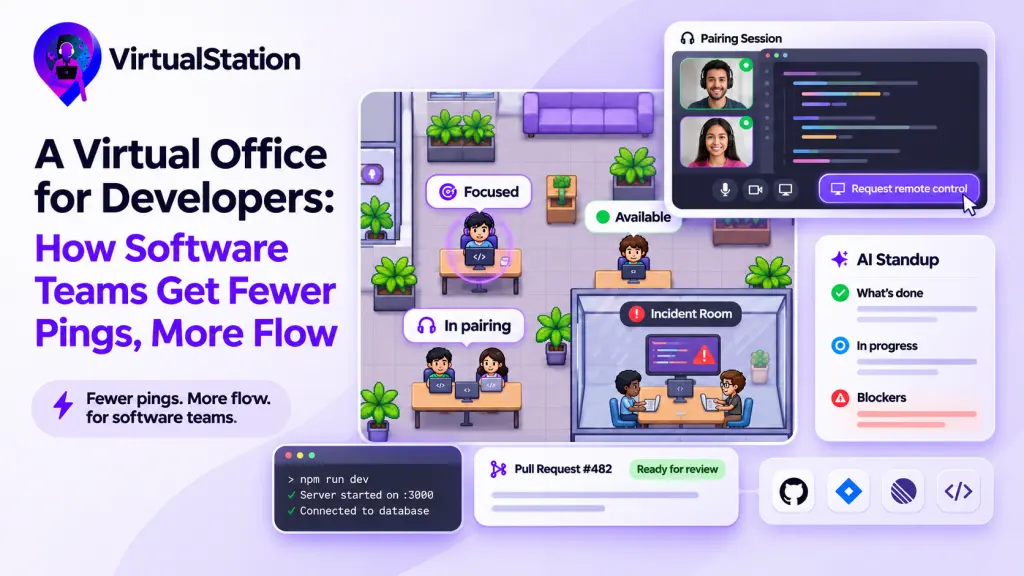
Pairing and mob debugging are where a virtual office earns its keep for engineers. You want screen sharing with good resolution, and ideally the ability for the other person to take control with permission, so “can you just try it” does not turn into dictating keystrokes. A named pairing room with the door open signals that others are welcome to watch and learn.
Be clear about what the office does and does not do here. It handles the call, the screen and the “who is free to help” part. Shared typing in the same files is still an editor job. Microsoft’s own docs now say Visual Studio Live Share is in maintenance mode, with no additional features planned, so check what your team’s editor supports before you build your pairing habits around one plugin.
Standups that do not eat the morning
A 15-minute live standup in the middle of the morning is exactly the kind of meeting that splits a maker’s day. Written async standups, collected when it suits each person’s time zone and summarized for the team, keep the information and drop the interruption. We cover this more in how to run async standups.
Connections to where the code lives
If the office knows nothing about your issues and pull requests, it is just a nicer phone. Check for GitHub, Jira or Linear integrations so presence, standups and tasks refer to real work.
No surveillance creep
Engineers are quick to notice when “presence” turns into “monitoring”. Decide up front what is visible and to whom, and write it down. Activity metrics are a poor proxy for engineering work: a morning spent reading a spec and arguing about a schema looks idle to a keystroke counter. If your tool has time tracking, keep it optional and tied to clear reasons like client billing.
A virtual office setup for software teams
Here is a layout and set of norms we would start with for a team of 8 to 20 engineers. Adjust freely.
| Space | What it is for | Norm |
|---|---|---|
| Team area | Default place to sit | Mic off, quick questions welcome if status is available |
| Focus pod | Deep work | Do not knock. Leave a message. |
| Pairing rooms (2 or 3) | Pairing, debugging, code review walk-throughs | Door open means anyone can join and watch |
| Incident room | Production issues | Anyone on call joins immediately |
| Meeting room | Planning, retros, design reviews | Scheduled, with notes |
| Lounge | Social time | Optional, never required |
A few habits make the layout work:
- Agree on focus blocks. For example, mornings in a team’s main time zone are focus by default, and ad hoc calls wait until after lunch unless something is on fire.
- Move the standup to writing. Keep one short live sync a week for things that need discussion.
- Put blockers where everyone can see them. A blocker in a DM helps one person. A blocker in the standup summary helps the whole team.
- Respect time zones. Show working hours next to presence, so nobody pings someone at 11pm their time. Our post on time-zone handoffs covers the rest.
- Review after a month. Ask the team whether they feel more or less interrupted. That one question beats any usage dashboard.
Incidents and on-call: where the office earns its keep
Production incidents are the one time a software team genuinely wants to be interrupted, fast. A permanent incident room beats spinning up a fresh call link at 2am, because everyone already knows where to go and who is in there.
- One named room, always there. On-call engineers join it the moment an alert fires. Anyone else who sees the room is busy can tell something is happening without asking.
- One person shares the screen. Dashboards, logs and the deploy pipeline go on one shared screen so people are not reading different graphs.
- Someone writes the timeline. A running note of what was tried and when saves the postmortem from relying on memory.
- Focus status still counts. People not on call should not be pulled in just because they look available. Page the rotation, not the floor.
How virtual offices go wrong for engineering teams
We have seen the same few failure modes come up again and again. None of them are about features.
- The manager lives in the office, the engineers do not. If only leads keep the office open, it becomes a place to be seen rather than a place to work. Ask the team to try it for two full weeks before anyone judges it.
- Everyone is always “available”. When nobody sets focus, the status means nothing and people go back to DMs. Make focus the default for mornings and see what happens.
- Every room is a meeting. If joining someone always starts a video call, people avoid it. Quick audio, with cameras optional, keeps drop-ins light.
- Presence gets used as a performance metric. The fastest way to kill trust is to mention in a review that someone was “offline a lot”. Presence is for coordination, not evaluation. If you need to talk about output, talk about the work.
Which virtual office tools fit developers
Several virtual offices can work for engineering teams. We compare them in more depth in our guide to the best virtual office software. Here are the criteria that matter most for developers, using vendor pages as of November 2026. We make VirtualStation, so weigh our row accordingly.
| Tool | Developer-relevant features (per vendor) | Focus controls | Price as of November 2026 |
|---|---|---|---|
| Gather | GitHub integration on the Essential plan | Busy/available status synced with calendar, Mini Mode | Essential $12/member/month billed yearly; no free plan |
| Roam | GitHub pull requests on the office map, MCP server, developer API | Audio drop-ins by knocking | $19.50 per active member/month (USD) |
| WorkAdventure | Open source, self-hostable on your own servers | Not checked | Free space for up to 10 people; paid plans on its pricing page |
| Slack huddles | Quick calls from a channel or DM, no office map | Not an office: no shared presence map | Group huddles on paid Slack plans; free plan capped at two people and 30 minutes |
| VirtualStation | GitHub, Jira, Linear and Slack integrations; remote control on screen share; built-in tasks | Focus status with timer and “send a message for later” nudge | Free up to 5 people; Pro $12/person/month billed yearly ($15 monthly) |
A few notes the table cannot carry:
- Gather suits teams that enjoy a game-style space, and its pricing page lists the GitHub integration under Essential.
- Roam is built around audio drop-ins and replacing chat and meetings at once. Its own virtual office platform guide says Roam bills monthly only, for active members, with no free tier. That is a vendor comparison page, so read its competitor columns with care.
- WorkAdventure is the option to look at if security rules require self-hosting. Its site says the code is on GitHub and offers guides for deploying on your own servers.
- Slack huddles may be enough if you mainly want quick calls from a channel and do not need presence beyond a status emoji. Slack’s huddles page says the free plan allows two people for up to 30 minutes, with unlimited group huddles on paid plans.
VirtualStation for software teams
We make VirtualStation, so weigh this accordingly. Its team presence shows who is available, in a meeting or in focus, with a timer and a nudge to “send a message for later instead”, plus each person’s working hours in your time zone. Remote control lets a teammate ask to take the lead while viewing a shared screen, and access starts only after the sharer approves. AI Standups collect three written answers (done, next, blockers) on each person’s schedule and turn them into one team briefing with blockers flagged. It integrates with GitHub, Jira, Linear and Slack, and has its own projects and tasks if you want them. As of November 2026 it is free for up to 5 people, and Pro is $12 per person per month billed yearly or $15 monthly.
Who it is not for: if your team is happy in Slack and Linear and only wants a casual hangout space, a full workspace is more change than you need. And if you need a self-hosted tool for security reasons, look at open-source options like WorkAdventure instead.
Frequently asked questions
What is a virtual office for developers?
It is an always-open online space for a software team: a map or list of rooms showing who is available, focused or in a call, with one-click audio, screen sharing and pairing rooms. The point is to make quick questions and pairing cheap while letting people mark focus time so others leave a message instead of calling.
Is a virtual office the same as a virtual business address?
No. A virtual business address is a service that gives a company a mailing address, mail handling and sometimes bookable meeting rooms. Virtual office software is a collaboration tool for remote teams. Some developer agencies use both: an address for the registered office, and software for daily teamwork.
Will a virtual office interrupt developers more?
It can, if everyone is always shown as available and every click starts a video call. Set focus as the default for agreed blocks, make “leave a message” the default action on a focused person, and keep drop-ins audio-only. Microsoft research on developer workdays found interruptions hurt most during coding phases, so time your norms to the work.
Can a virtual office replace Slack for a software team?
Sometimes. Tools with built-in chat can replace Slack for a small team, but many engineering teams keep Slack for bots, alerts and integrations and use the virtual office for presence, calls and pairing. Decide which tool owns written discussion before rollout, or people will ask the same question in both places.
Is there an open-source virtual office for developers?
Yes. WorkAdventure publishes its code on GitHub and documents how to deploy it on your own servers, which suits teams with strict security or data residency rules. Expect to own the hosting, updates and map design yourself, which is real engineering time.
Our take
A virtual office for developers should feel quieter than Slack, not louder. If people feel more watched or more interrupted after a month, the setup is wrong, whatever the tool. Start with focus as the default, make pairing and quick questions easy to choose, and move status updates to writing. Then the office becomes the place people go to work together, not the place they go to get pinged.
If you want to try that setup, start a 14-day free trial of VirtualStation. No card needed.
Sources
- Atlassian, Atlassian research: AI adoption is rising, but friction persists, July 9, 2025
- Microsoft WorkLab, Breaking down the infinite workday, June 17, 2025
- Microsoft Research, Today Was a Good Day: The Daily Life of Software Developers, Meyer, Barr, Bird and Zimmermann, IEEE Transactions on Software Engineering, 2019
- Paul Graham, Maker’s Schedule, Manager’s Schedule, July 2009
- Gather, Pricing, accessed November 2026
- Roam, Product overview, accessed November 2026
- Slack, Huddles, accessed November 2026
- Roam, Virtual Office Platform, accessed November 2026
- WorkAdventure, Virtual Office and Remote Event App, accessed November 2026
- Microsoft Learn, What is Live Share?, updated May 2026
- VirtualStation, Team Presence
- VirtualStation, Remote Control product page (virtualstation.io/remote-control/)
- VirtualStation, AI Standups
- VirtualStation, Integrations product page (virtualstation.io/integrations/)
- VirtualStation, Pricing page (virtualstation.io/pricing/), accessed November 2026
From the VirtualStation team
See who's around, what's moving and what's stuck
VirtualStation puts your team's presence, meetings, chat, tasks and AI standups in one workspace, so the answer to "how's it going?" is already on screen.
No credit card required